AI takeoff
for commercial estimators.
Yanno reads your commercial drawings and takes you from takeoff to a bid-ready proposal. Walls, doors, rooms, and glazing. Priced with your own rates.
7-day free trial. Cancel anytime.

AI takeoff that does the measuring
Yanno detects walls, doors, glazing, and rooms, then does the counting and measuring so your team moves faster on every bid.
Wall linear footage, by wall type
Yanno traces the walls on the plan, snaps to drawing geometry, and totals linear footage. Select “Walls by type” and it reads the wall tags or legend on the sheet, then breaks the footage out per type automatically – one line per partition type, no re-tracing. Adjust thickness and merge segments in the takeoff editor.
Door schedules, read and counted
Yanno reads the door schedule on the sheet and turns it into counts by door type, frame type, and hardware group. On the plan, it finds each door, sorts it as single or double, and marks its location. Toggle door openings in or out of wall LF totals with one click.
Glazing
Yanno detects glazing as its own class, separate from walls and doors. Curtain wall, storefront, interior sidelites, borrowed lites, and punched windows all come back as glass. Take it off as linear feet and reclassify by type in the editor.
Room areas
Yanno detects room polygons and totals the SF. Edit boundaries with the vertex editor when you need to fine-tune.

The whole bid.One platform.

The whole bid.One platform.
You own every quantity
AI gives you a head start. The takeoff editor is where you apply your judgment – reclassify, group, and adjust until the takeoff matches how you bid.
Adjust anything in seconds
Fix a detection or add your own. Drag it, trim it, or draw it by hand, and every total updates in seconds.

Reclassify and group in bulk
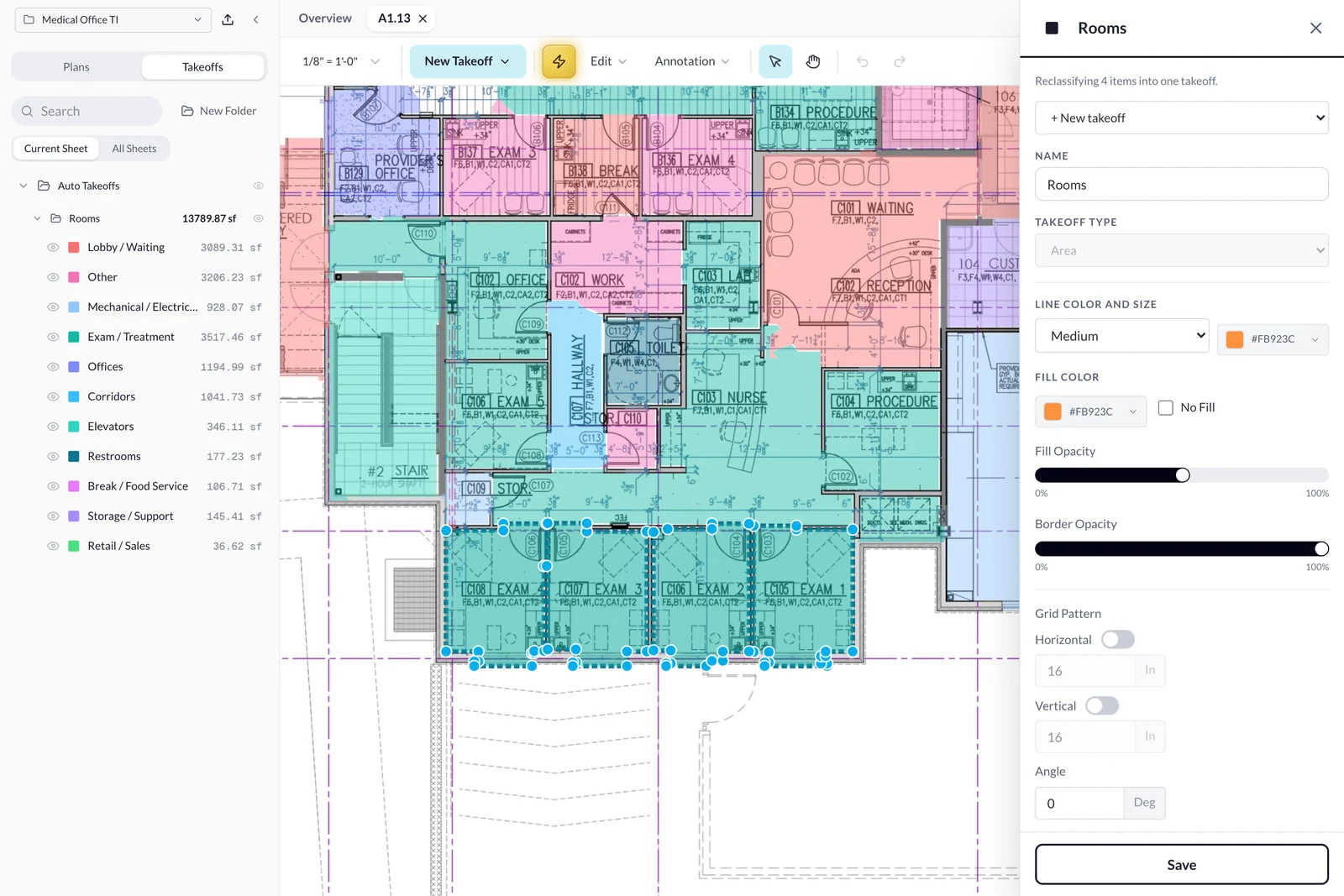
Box-select a group of room detections on the floor plan and set the type in one action – office, corridor, exam room. Then merge those areas into the line items your estimate actually uses – by finish, by trade, by floor.
Full plan sets, not single pages
Upload the whole multi-sheet PDF, run takeoff sheet by sheet, and switch pages freely. Every page keeps its own quantities and nothing gets lost.

From takeoff to a bid-ready proposal
The measuring is only half the job. Yanno carries every quantity into a live estimate worksheet, then builds the client-facing proposal for you. No retyping, no copy-paste between tools.
Run the takeoff
Walls, doors, glazing, and rooms. AI-detected or manually measured.
Price the worksheet
Every quantity lands on the estimate automatically, already priced where you applied a cost assembly. Add rates for the rest.
Send the proposal
A branded, client-ready bid form builds itself. Review, make adjustments, export.
A worksheet that starts full
Open the Estimates tab and the takeoff work is already there – organized, quantified, waiting for rates.
Takeoffs autofill the estimate
Every takeoff, AI or manual, flows into the worksheet as a line item with its quantity live. Change the drawing and the estimate follows.
Labor, material, equipment, subcontract
Price each component its own way – per takeoff quantity, per its own unit (hours, EA), or lump sum. Waste percent and multipliers per line.
Cost assemblies – your price book
Save labor and material rates per SF, LF, or each (or by the hour and lump sum) as named assemblies, organized by CSI section. Apply one to a takeoff and its worksheet line arrives priced, with the section's CSI code when you have set one. Any priced worksheet line, takeoff or custom, saves back as an assembly.
Anything the drawings do not show
Add custom line items and general conditions for permits, supervision, and dumpsters – the whole job, not just what is on the plan.
Your rates, saved once
Templates work like rate cards – line items and dollar rates carry to the next job, quantities start fresh. Overhead, fee, GRT, and permit markup stack automatically.


Every bid leaves in your firm's voice
Load your rates, markups, and standard language once, and save it all as a template. Every estimate after that exports as a branded, sendable proposal, assembled from your own work.
Nothing is invented for you
Yanno assembles the document. Logo, license, and branding come from your profile. Line items, totals, scope summary, exclusions, inclusions, allowances, and alternates carry straight from your estimate.
The same standard, every time
Your exclusions and scope language are saved, not retyped. The clarification that saved you last year does not get left off this year's bid, no matter who on your team built the estimate.
Edit before it leaves
A live preview lets you reorder or hide line items, adjust wording, and restyle fonts and colors, without touching the underlying estimate.
One PDF, everything attached
Merge marked-up drawings and project documents into the proposal so the client gets a single file.
Excel and CSV when you want them
Export the full estimate summary to your own bid sheet, organized and totaled.
How Yanno works
From drawing set to sendable proposal.
Upload and set scale
AI detects and measures
Review and reclassify
Price it with your numbers
Send the proposal
Built for commercial construction teams
General contractors
Wall, door, glazing, and room takeoffs on any commercial interior, from tenant improvement and retail to healthcare, hospitality, and education.
Drywall and framing
Wall linear footage broken out by wall type, plus opening counts, for fast quotes.
Glazing
Storefront, interior glass, and window quantities, detected as their own glazing class.
Doors, frames, and hardware
Door schedules read into counts by door type, frame type, and hardware group, plus door counts from the plan, split into single and double.
Finish trades
Room areas for flooring and ceilings, plus wall surface area for paint and wall finishes.
Independent estimators
Takeoffs, estimates, and proposals for every client you bid, with a separate rate template saved per contractor.
Everything else you would expect
The rest of the toolbox is here too – no add-ons, no upsells.
Walls broken out by type
Select “Walls by type” and the footage splits per partition type, read from the wall tags or legend on the sheet.
Cost assemblies
Save labor and material rates per unit once, apply one to a takeoff, and its estimate line arrives priced.
Symbol search and count
Pick a symbol once. Yanno finds and counts its matches across the sheet.
Text-tag search
Type a tag like “SK-1” and count every occurrence straight from the drawing text.
Two-click scale calibration
Presets or a measured known distance – every quantity recomputes instantly.
Rooms grouped by type
Detected rooms auto-categorize – offices, studios, corridors, restrooms.
Takeoff styling
Per-takeoff color, opacity, and label visibility for clean, readable sheets.
Legend overlay
Drop a live legend of item names, colors, and totals anywhere on the drawing.
Annotations and callouts
Mark up sheets with notes and callouts the whole bid team can read.
Print and PDF sheet export
Export marked-up drawings at full quality, with or without annotations.
Bid calendar
Track bid due dates across every open project in one view.
Project documents
Keep specs, addenda, and quotes with the job, and attach them to proposals.
Sheets name themselves
Sheet numbers read automatically from the title block.
Autosave everywhere
Every edit saves to the cloud as you work, so you can come back any time and pick up where you left off.
Door schedule takeoffs
Yanno reads the door schedule on the sheet and counts doors by door type, frame type, and hardware group.
Simple pricing
Cancel anytime. You keep full access through the end of your billing period.
Billed annually. Save $360.
- Unlimited takeoffs and full multi-sheet plan sets
- AI detection of walls, doors, glazing, and rooms, with wall footage by wall type
- Takeoff editor with bulk reclassify and manual drawing
- Symbol and text-tag search and count
- Estimate worksheet with saved cost assemblies, rates, markups, and templates
- Branded proposal builder with your standard scope language
- Excel, CSV, and PDF export
- Email support
- Cancel anytime
7-day free trial.
30-day money-back guarantee · Cancel anytime
Frequently asked questions
What does Yanno detect?
Walls, doors, rooms, and glazing. Yanno also breaks wall footage out by wall type, reads door schedules into counts by door type, frame type, and hardware group, and finds and counts any repeated symbol or text tag you pick.
What makes Yanno different?
Takeoff, estimate, and proposal in one place. Your quantities carry straight into an estimate worksheet priced with your saved cost assemblies, rates, and markups, then into a branded proposal with your standard scope language.
Do I need to install anything?
No. Yanno runs in your browser, and your work autosaves to the cloud as you go.
How does the free trial work?
Every new account starts with a 7-day free trial of the full product. Cancel anytime.
Is there a money-back guarantee?
Yes. Your first subscription comes with a 30-day money-back guarantee on top of the free trial. If Yanno isn't the right fit in your first 30 days of paying, email support@yanno.ai and we'll refund you in full. Note that we are currently running promotional launch pricing, and that rate stays your rate for as long as you stay subscribed.
What happens when I cancel?
Cancel anytime from Settings. Your plan stays active through the end of the trial or billing period you are in, and you won't be charged again.
Try Yanno on your next bid
7-day free trial · 30-day money-back guarantee · Cancel anytime